ECPay Settings
This tutorial explains how to obtain the HashKey and HashIV from ECPay and enter them into Stream Toolkit.
Step 1: Log in to the ECPay Merchant Dashboard
- Go to the ECPay official website
- Click Seller Login → Merchant Zone in the top right corner
Step 2: Enter System Integration Settings
-
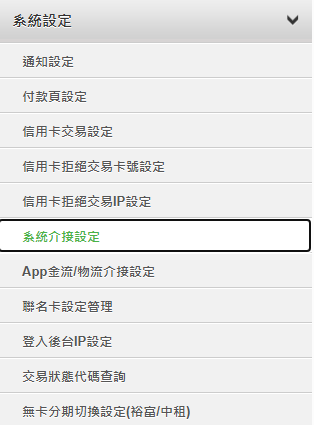
Click System Settings in the left menu
-
Select System Integration Settings
-
Find Integration Hash Key and Integration Hash IV

Step 3: Enter in Stream Toolkit
- Open Stream Toolkit
- Click Settings in the bottom left menu
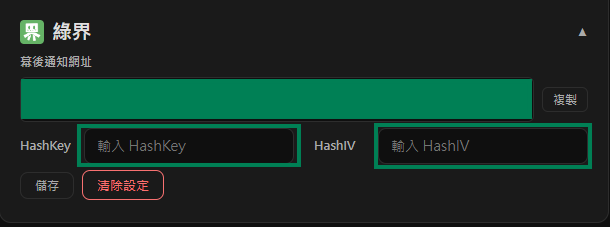
- Find ECPay in Donation Platform Integration
- Paste the Integration HashKey and Integration HashIV from System Integration Settings into the Hash Key and Hash IV fields, respectively
- Click Save
Step 4: Set Notification URL
-
Copy the ECPay Webhook URL

-
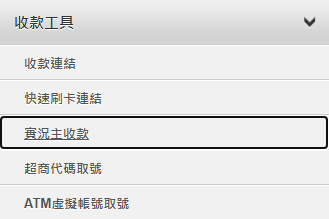
In the ECPay Merchant Dashboard, find Payment Tools → Streamer Payments
-
Paste the Webhook URL into the Payment Completion Notification Return URL field

-
Click Save Settings
FAQ
Q: Can't see "System Settings" after logging in? Your account may not have finished the verification process. Please go to "Merchant Data Management" to check the status.
Q: Can HashKey be made public? No. HashKey and HashIV are private keys; please do not share screenshots or post them in public.