Obtaining DeepL API Key
DeepL API Key is used for automatic translation of the following features:
- Voice Translation — Automatic translation after converting speech to text
- Chat — Automatic translation of viewer messages
Step 1: Log in to your DeepL account
Go to DeepL and log in to your account. If you don't have an account yet, you need to register first.
Step 2: Enter Account settings
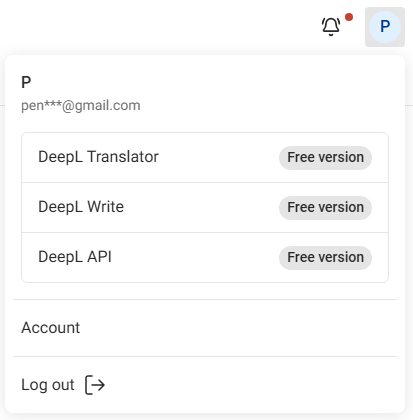
Click the profile icon in the top right corner and select Account.
Step 3: Switch to the API Keys & limits tab
Click the API Keys & limits tab.

Step 4: Create a new API Key
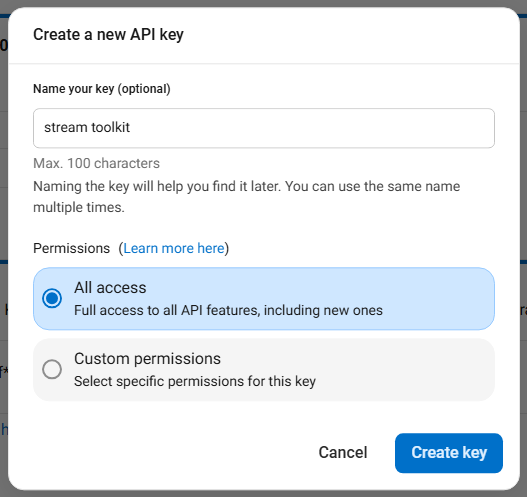
- Click Create key +
- Name your key: Enter any name (e.g.,
Stream Toolkit) - Permissions: Select All access
- Click Create Key

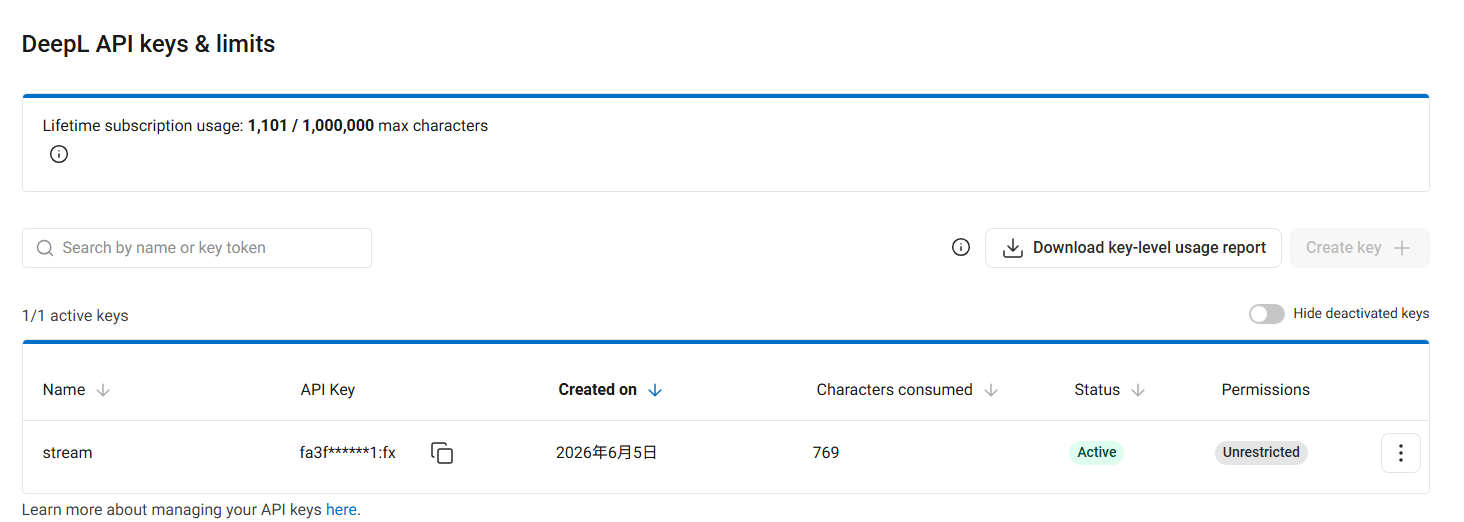
Step 5: Copy and paste into the App
- Copy the generated API Key
- Return to Stream Toolkit and paste it into the corresponding DeepL API Key field
FAQ
Q: Does the DeepL free trial have usage limits? Yes. The free trial provides a 1,000,000 character quota and is limited to one month. For continued use of high-quality translation, please subscribe to a DeepL paid plan.
Q: What should I do if my API Key is leaked? Return to DeepL Account → API Keys & limits, delete the old Key, and create a new one.